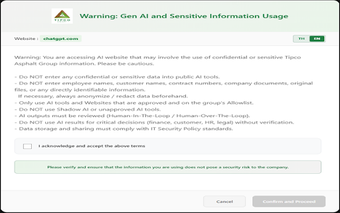
Deliberate navigation control for Chrome: Website Access Confirmation
Website Access Confirmation, developed by Yusuke Iwaki, is a Chrome extension that adds a deliberate checkpoint before visiting specified sites. It intercepts navigation to registered URLs and shows a confirmation dialog that requires explicit consent before a page loads. The extension offers direct URL registration, a quick toolbar toggle, and a minimal setup process. It targets productivity-minded users, developers avoiding accidental production visits, and anyone prone to frequent misclicks.
What is Website Access Confirmation used for?
The extension acts as a deliberate gatekeeper for selected pages by pausing navigation to URLs you enter and asking for permission before continuing. That behavior addresses three practical scenarios:
preventing accidental clicks to distracting websites
adding a precaution before opening production servers
creating short breaks to support focused work
Configuration is straightforward: add exact addresses to the list and enable the check.
How much memory and speed does it use?
Browser impact is deliberately low, because the tool is designed to run in the background without affecting page loads or responsiveness. A simple toggle in the toolbar lets you enable or disable the prompts quickly, so interaction overhead stays minimal during normal browsing. For users who keep many tabs open, the extension’s lightweight approach avoids introducing visible delays to browsing sessions.
Does Website Access Confirmation keep my browsing data private?
URL checks happen locally inside the browser profile, and the extension is described as not typically transmitting browsing history to external servers. Matching uses explicit URL entries rather than pattern rules, which reduces the need for remote processing or sync and keeps registered addresses under local control. This design favors privacy-conscious setups that avoid server-side rule management.
Is it suitable for multi-browser or power-user workflows?
The extension runs across Chromium-based browsers, including Chrome, Edge, Brave and Vivaldi, making it practical for people who switch engines. Power users should note the lack of wildcard or pattern matching: each site requires a manual entry. That trade-off preserves a compact interface but may frustrate users who depend on broad, automated rule sets across many domains.
Final assessment: a focused, low-overhead choice for deliberate browsing
Website Access Confirmation suits users who want a single, noninvasive layer of decision-making before visiting specific sites; it fits those who prefer minimal setup and local processing. Expect to maintain the registered list manually if you track many addresses. Tip: use separate browser profiles or curated bookmark folders to confine prompts to work or focus sessions, rather than applying them across every browsing context.
Pros
Pause-before-access model encourages intentional visits
Direct URL registration and quick toolbar toggle for fast setup
Runs locally, does not typically transmit browsing history
Compatible with Chromium-based browsers for cross-engine use
Cons
No wildcard or pattern matching; requires manual entries
Not a site blocker, only pauses navigation until confirmed
Manual maintenance can be tedious for many registered sites
Laws concerning the use of this software vary from country to country. We do not encourage or condone the use of this program if it is in violation of these laws. Softonic may receive a referral fee if you click or buy any of the products featured here.